TAG Mobile APN is a setting on the cellular device that uses the TAG Mobile network and partners to provide network services and connection to the internet. A successful internet connection requires a data plan and network coverage. TAG Mobile uses the AT&T network to provide cellular network coverage in the United States.
APN is the name of the gateway on the service provider’s network that the device connects to. The setting contains a host of other settings though like the type of APN and the protocol.

Android Devices
APN Settings on Android
Access the APN setting page on Android by navigating to:
- Settings
- Connections / Network & internet / Wireless & internet / More
- Mobile networks / SIMs then select TAG Mobile
- Access point names
- Add / +
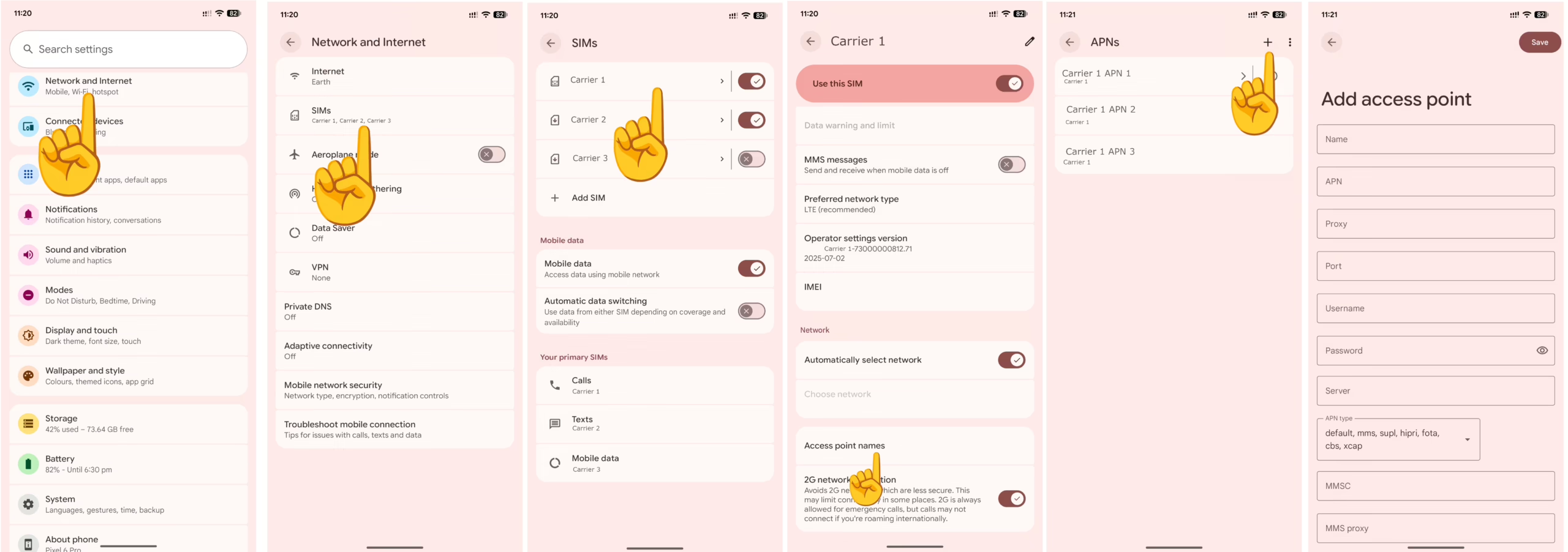
Input the TAG Mobile APN settings below.
TAG Mobile APN Settings for Android Devices
Leave other sections blank or with their default configuration.
- Name: TAG Mobile
- APN: ereseller
- MMSC: http://mmsc.mobile.att.net
- MMS Proxy: proxy.mobile.att.net
- MMS Port: 80
- MCC: 310
- MNC: 280
- APN type: default,mms,supl
- APN protocol: IPv4/IPv6
- APN roaming protocol: IPv4/IPv6
Save then select TAG as your APN. Restart your Android device.
Apple iPhone / iOS
APN Settings Location on iPhone / iOS
APN settings page on an iPhone can be located by navigating to:
- Settings
- Cellular / Mobile Data / Mobile Service
- Cellular Data Network / Mobile Data Network
Input the TAG Mobile APN settings below for iPhones.
TAG Mobile APN Settings for iPhone
Leave the Username and password fields blank.
- APN: ereseller
- Username:
- Password:
Save the settings then turn OFF and ON your mobile data.