Reachout Wireless APN settings for connecting to cellular networks and the internet.
The APN settings contains the APN; which is the name of the gateway, type of APN and MMS settings. Set them below.
Android Devices
APN Settings on Android
Access the APN setting page on Android by navigating to:
- Settings
- Connections / Network & internet / Wireless & internet / More
- Mobile networks / SIMs then select Reachout Wireless
- Access point names
- Add / +
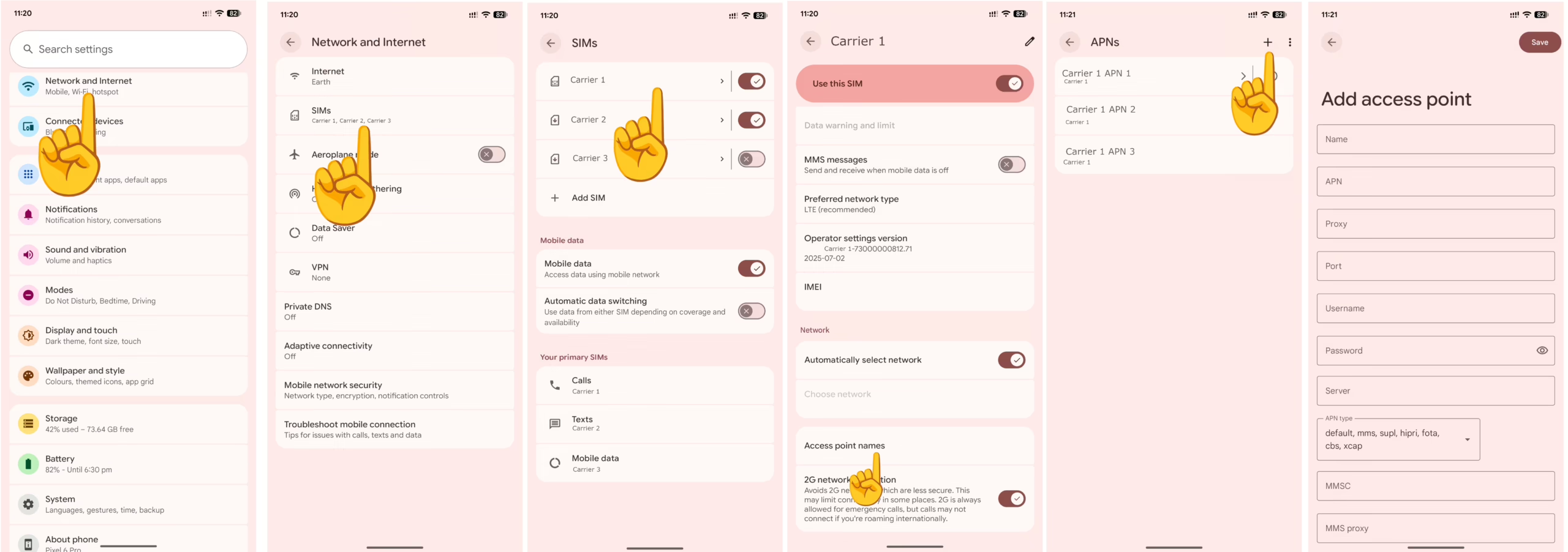
Input the APN settings below.
Reachout Wireless APN Settings for Android Devices
Input the settings below and leave other fields blank or with their default figures.
- Name: Reachout Wireless
- APN: internet
- APN type: default,mms,supl
- APN protocol: IPv4/IPv6
- APN roaming protocol: IPv4/IPv6
Save then select Reachout Wireless as the active APN.
Apple iPhone / iOS
APN Settings on iPhone / iOS
APN settings page on an iPhone can be located by navigating to:
- Settings
- Cellular / Mobile Data / Mobile Service
- Cellular Data Network / Mobile Data Network
Input the APN settings below for iPhones.
Reachout Wireless APN Settings for iPhone
Leave the Username and Password fields blank.
- APN: internet
- Username:
- Password:
Turn off and on your mobile data.